
Practice Describe Image with AI Scoring
Strengthen your ability to describe graphs, charts, and images effectively with guided practice and smart AI scoring feedback.
Pte Practice Test - Describe Image
speaking and answer questions
Look at the image below. In 40 seconds, please speak into the microphone and describe in detail what the image is showing. You will have 40 seconds to give your response.
Click on the image to view it in full size.
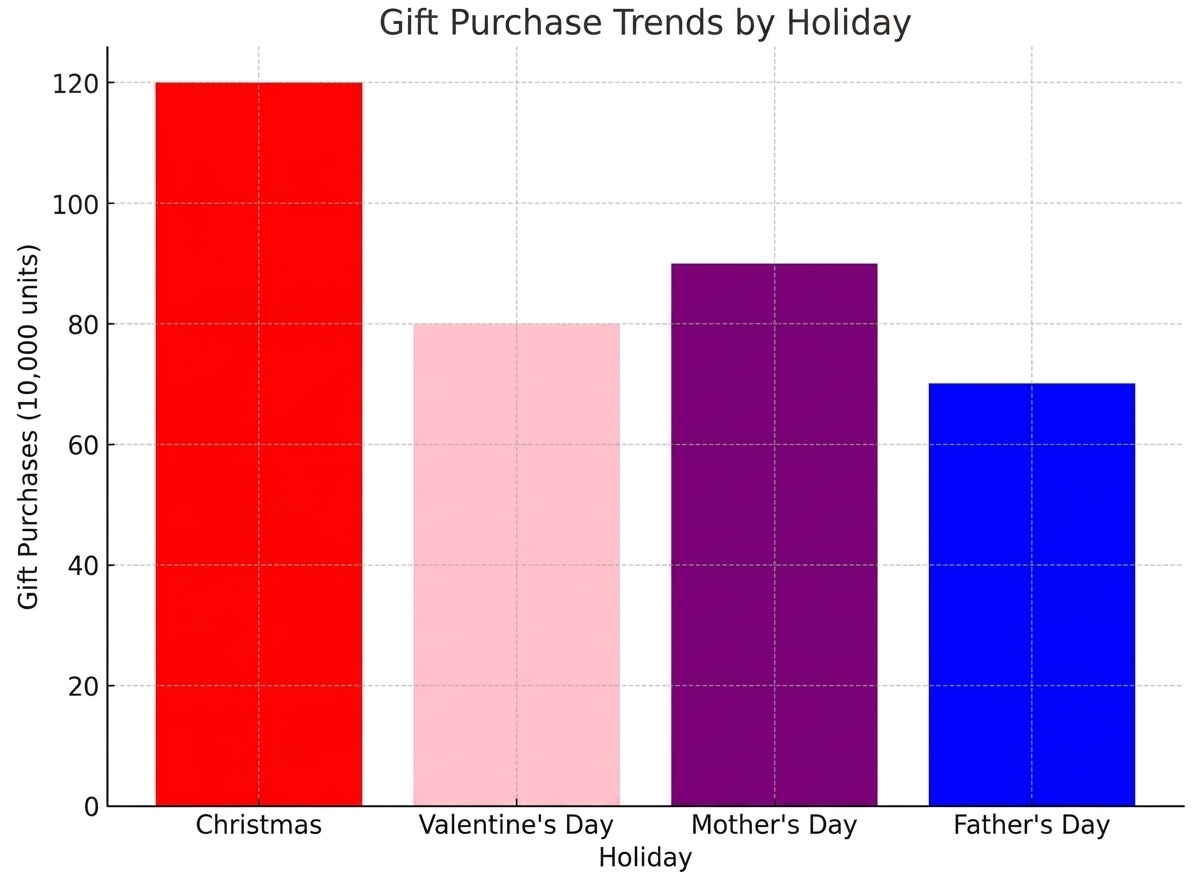
Overview of Describe Image Task
In this task, you are shown an image such as a graph, chart, or diagram and must describe it clearly within time, focusing on key details and structure.
Expert Tips to Improve Your Score
Learn proven strategies to organize your response, highlight key points, and improve fluency in the Describe Image task.

PTE Prep Boost
Unlimited Access Includes
Develop Your Personalised Speaking Study Plan
Create a personalized plan to improve fluency, vocabulary, and image description skills for higher scores.
My PTE Speaking Plan
79+
score After Practice
0
Months Left for Exam
25
Practice Questions

Why Choose Us? Your Speaking Success is Our Priority
Prepare with AI scoring, expert tips, and real exam simulations designed to boost speaking performance.

3.7M +Students
Connect and learn with a global PTE learner community
8k +Questions
Practice with real exam-style images and graphs.
90% Achieved Their Target Score
Learners consistently improve speaking scores with analytics and feedback.

 (4.8)
(4.8)Used by 2.3 M+ Members
Practice with India's Leading PTE Mock Test Platform
 Real Exam Experience
Instant Evaluation
Expert Strategies


Unlock Your Speaking Potential with Practice Tests

Start Your Image Description Practice
Practice describing charts, graphs, and visuals clearly.
Improve Speaking Fluency
Learn to structure responses logically and confidently.
Review Your Performance
Analyze AI feedback to improve content and pronunciation.
We have partnered with1800+ top universitiesto support your study abroad journey!
Connect with our Experts


Frequently Asked Questions
PTE Describe Image is a Speaking task where you describe an image shown on the screen within the given time. You may need to describe graphs, charts, tables, maps, processes, or other visual information.
Practise different image types regularly and follow a simple structure. Focus on identifying the main features, comparing important details, and speaking clearly and fluently.
Improve your score by focusing on content, oral fluency, and pronunciation. Practise describing the main trend or feature first, then add relevant supporting details.
Yes, you can use a flexible structure to organise your response. However, avoid memorising a long answer because your response should accurately describe the information shown in the image.
Aim to use most of the available response time while maintaining natural fluency. Avoid stopping too early or adding irrelevant information simply to fill the time.
Start with the type or main subject of the image and identify its most important feature. Then explain the key data, trends, comparisons, or relationships.
Identify the graph type and describe the overall trend first. Then mention significant increases, decreases, highest or lowest values, and useful comparisons.
Begin by identifying what the bar chart represents. Focus on the highest and lowest values, major differences, and noticeable trends instead of describing every bar.
Mention what the pie chart represents and focus on the largest and smallest segments. You can also compare significant percentages or categories.
Identify what the table shows and highlight the most noticeable values, differences, or patterns. Select important information rather than reading every number.
Explain the process in the correct sequence using linking words such as “first,” “next,” “then,” and “finally.” Focus on the major stages rather than every small detail.
Start by explaining what the map represents and then describe the important locations, changes, directions, or relationships shown in it.
Identify the image type and describe the features you can clearly observe. Focus on the main visual information and maintain fluent speech rather than remaining silent.
Practise speaking continuously without unnecessary pauses. Use a simple response structure and familiar linking phrases so you can organise your ideas quickly.
Prepare a flexible structure and practise with a timer. Instead of stopping when you forget a detail, move to another relevant feature of the image.
Quick Links
Describe Image task is usually considered to be one of the most difficult tasks in the PTE Speaking section module, and that is because of the need to convert visual information into speech and structure it in such a manner that it flows smoothly, all within a limited time frame. Many test takers, even those who perform well in other questions, find this task tough mainly because there are no scripts to refer to.
This guide will cover the official format, the scoring criteria based on Pearson’s guidelines, and a few proven techniques to help guide you through the PTE Describe Image Practice phase.
What Is the PTE Describe Image Task?
The PTE Describe Image is one of the tasks in the speaking section, which requires you to explain a picture that may take the form of a graph, a map, a diagram, a chart, or even a photograph, and you are expected to describe it in coherent speech. It is one of the key components of your PTE speaking practice phase, given it evaluates how you analyse visual information and explain the findings clearly.
- The image appears on screen along with a short preparation window before you begin speaking.
- Your response is recorded and 100% scored by Pearson’s automated AI engine. No human examiner is checking your content layer during or after the test.
- Describe Image evaluates how accurately you interpret the image, how naturally your speech flows, and how clearly you pronounce your words.
- There is no fixed text to read, so your vocabulary and ability to structure ideas on the spot matter significantly.
- The task appears multiple times across the test, giving you several opportunities to demonstrate consistent performance.
PTE Describe Image Task Format Explained
The format of this task remains fixed across every version of the exam, which makes PTE Describe Image exam practice more precise and accurate rather than vague guesswork.
- You are given 25 seconds of preparation time before the recording begins.
- You then have approximately 40 seconds to describe the image once the microphone opens.
- 5 and 6 questions of this type typically appear in a standard test attempt.
- The task assesses the Speaking communicative skill and follows a partial credit scoring model, meaning you can score somewhere between the minimum and maximum rather than an all-or-nothing outcome.
- The time factor and the arrangement are the same whether you are preparing for PTE Academic or PTE Core.
- The time available is very limited, and hence how you utilise those 25 seconds usually decides the overall quality of your answer.
PTE Describe Image Scoring Criteria
As described in the official Test Taker Score Guide from Pearson, the PTE Describe Image 2026 has three distinct scoring criteria. Here is a clear explanation of each criterion to help you understand better.
1. Content (scored 0 to 6): It is an evaluation of your ability to depict the image accurately and to comprehend the relationship between the various elements of the image.
- A 6 indicates an ability to give an answer that depicts the whole image, elaborates on the relationship of the elements, and allows the listener to form an image in their mind without seeing the actual image.
- A 4 is awarded for a response that is accurately described but not very specific, where an observer would have gotten a general picture, not a specific one.
- A 0 is awarded for a response that is on topic but is inadequate or insufficient to score anything higher.
2. Pronunciation (scored 0 to 5): It will assess the pronunciation of your vowels, consonants, and word stress to the point where an average English speaker can understand you. This test score is awarded entirely by Pearson's automatic speech engine.
3. Oral Fluency (scored 0 to 5): This focuses on the rhythm of your speaking pace, along with pauses, stops, or unnatural gaps in your speech, just like Pronunciation, and is graded solely through AI.
All these skills are taken into account to get the score for the specific question, and this score forms part of the Speaking score and the overall PTE score.
Types of Images in the PTE Describe Image Task
The image bank for this task is genuinely diverse, and recognising the type quickly during your 25 seconds of preparation time is half the battle. Using a range of PTE speaking describe image practice resources is what helps students ace this task.
- Bar graphs, which compare values across different categories using vertical or horizontal bars
- Pie charts, which break a whole into proportional segments, usually expressed as percentages.
- Line graphs, which track how a value changes over a period of time
- Tables, which represent data in numeric or alphabetical form arranged in columns and rows
- Maps, which represent geographic, directionally, or location-based information
- Process or flow charts, which lay out a sequence of steps or stages in chronological order
- Simple photographs or illustrations, which require descriptive rather than analytical language
- Mixed or combination images, which blend two data formats, such as a bar graph paired with a line, and demand a slightly more flexible response.
PTE Describe Image Templates for Different Image Types
A good template is something that will help you avoid your responses sounding robotic, provided it should be used as a framework rather than something to be memorised. The templates outlined below have the same general structure of an introduction, body, and conclusion, but they vary to suit each picture style.
- Bar graph: "The bar graph illustrates [topic] over [period]. It is evident that [category] holds the highest value at [figure], while [category] records the lowest at [figure]. Overall, the graph indicates [trend or comparison]."
- Pie chart: "The pie chart represents [topic], broken down by [categories]. The largest share is occupied by [category] at [percentage], followed by [category], while [category] accounts for the smallest portion. In summary, [key takeaway]."
- Line graph: "The line graph depicts the trend in [topic] from [start point] to [end point]. There is a noticeable [rise/fall] between [period], followed by [description of the remaining trend]. Overall, the graph reflects [conclusion]."
- Table: "The table presents data related to [topic]. [Category] shows a steady increase from [value] to [value], whereas [category] remains relatively stable throughout. In conclusion, the table highlights [main pattern]."
- Map: "The map illustrates [location or layout]. It can be observed that [landmark or area] is situated [direction/position] relative to [reference point]. Overall, the map provides a clear picture of [summary]."
- Process or flow chart: "The diagram outlines the process of [topic]. It begins with [first step], followed by [subsequent steps], and concludes with [final step]. This process demonstrates [overall purpose]."
- Photograph or picture: "The image depicts [setting or subject]. In the foreground, [detail], while in the background, [detail]. Overall, the picture conveys [general impression or mood]."
How to Answer PTE Describe Image Questions
You are only provided 25 seconds for preparation before you start speaking, and the most significant factor is using this preparation time wisely.
- Recognise the type of image right away, because it decides what template and vocabulary to use.
- The most important thing in identifying the main topic is scanning the title, axes, or main elements.
- Select a few highlights instead of trying to cover all the points because a concentrated answer will always get more marks than one that is hurried and overloaded.
- Plan your answer in a way that includes an introduction, a body highlighting some of the salient features, and a conclusion.
- Start talking immediately when you hear the recording because hesitation right from the start takes away precious seconds in the 40 seconds.
- Maintain a natural pace of delivery throughout because rushing for details ends up spoiling pronunciation and fluency.
Common Mistakes to Avoid in the PTE Describe Image Task
Most students who perform poorly in this test are not people with poor English skills. Rather, they are making some mistakes repeatedly that can easily be fixed.
- Concentrate on the most important features: Choose only the two or three most important features rather than discussing all the data points, as there may not be enough time left to conclude the answer.
- Repetitive reading of figures: Summarise patterns using descriptive language like “a constant increase” or “a rapid decline” instead of giving the figures consecutively.
- Answers in isolated statements: Use connecting expressions such as “it is clear that” or “in contrast to” to tie together your thoughts.
- Stumbling due to an unfamiliar image: Rely on the generic framework you have created, since introduction, body, and conclusion suit nearly every visual.
- Hastening through the answer: Keep a slow and steady speed, since precision and clarity should be considered more important than rushing.
- Speaking robotically: Adjust your template to the individual visual rather than repeating it verbatim, since creativity in phrasing will be valued over repetition.
Tips to Score High in PTE Describe Image
The tips given below represent the traits that always differentiate good answers from mediocre ones, and all of them do not involve mastering English language skills overnight.
- Learn to distinguish between different kinds of images fast, because distinguishing a bar chart from a flow chart in seconds can save you much preparation time.
- Create an adaptive template for each type of graph and learn how to modify it according to new information rather than just memorise a single one.
- Employ comparative vocabulary like "significantly higher," "decline," or "remains stable" to be more analytical than descriptive in your language.
- While practising, record your answers and review them for any pauses or repetitions that silently lower your fluency score.
- Try practising using a diverse range of images – even those you are not familiar with – to ensure that you can handle any type of image during the exam.
- You should attempt to talk for almost the entire 40 seconds so that your test taker can fully assess your performance.
Why Choose Gradding for PTE Describe Image Practice?
Consistent, realistic practice is what actually builds the confidence needed to handle this task well, and that is exactly what our platform is designed to support.
- Get access to a strong range of exam-style PTE Describe Image sample questions with types including bar graph, pie chart, line graph, table, map, process chart, and photo.
- Prepare with AI PTE Describe Image practice questions, where your answers will be marked automatically for content, pronunciation, and oral fluency.
- Get access to a PTE Describe Image Template that can be used for all types, together with advice on how to adjust the template naturally.
- Review detailed feedback that highlights exactly where your response fell short, whether in structure, vocabulary, or delivery.
- Track your improvement over time with a personalised speaking study plan built around your target score and exam date.
- Move from focused Describe Image practice into full-length mock tests, or join expert-led PTE online classes for additional guided support.
Practice makes all the difference between being afraid of PTE Exam Preparation and mastering each section to achieve your dream score. Learn how to build your template and then prepare using free Describe Image practice PTE resources.
